
Wood Door: who can open the wooden doors in your house
Wood Door decides whether a group can open and close the wooden doors in your house. It’s a low-risk permission most houses give everyone, with one catch: it covers every wooden door at once. Here’s what it does, where it is, and who should get it.
- Second on page 1
- On/off switch
- Wooden doors only
What the Wood Door permission does
Turn Wood Door on for a group, and everyone in it can open and close the wooden doors in your house like any other door. Turn it off, and those doors won’t open or close for them.
It’s one switch for the whole group, and it covers every wooden door in your house, so you can’t choose which doors it applies to. It only covers wooden doors: iron doors, trapdoors, and fence gates each have a permission of their own.
With Wood Door on, players can
- Open and close your wooden doors by right-clicking them
- Get in and out of rooms, shops, and buildings with wooden doors
- Close a door behind them
Wood Door doesn’t let them
- Place or break doors (that’s Build)
- Open iron doors (that’s Iron Door)
- Open trapdoors or fence gates (those are Wood Trap Door, Iron Trap Door, and Fence Gate)
Where to find Wood Door
Wood Door is the second permission in the editor: page 1, slot 2, as of October 2026, right after Fly.
- Open Permissions and Groups. Open the Housing Menu with the Nether Star in your hotbar, then click the paper icon in the middle of the bottom row.
- Open a group’s permissions. Click the group, then the Edit Permissions book at the end of the second row.
- Find Wood Door on page 1. It’s the second permission on the page, or you can click the compass and search for it.
- Check the color. Green means it’s on, and gray means it’s off. Click it to switch.
- Fly
- Wood Door
- Iron Door
- Wood Trap Door
- Iron Trap Door
- Fence Gate
- Button
- Lever
- Use Launch Pads
Wood Door is slot 2, between Fly in slot 1 and Iron Door in slot 3.
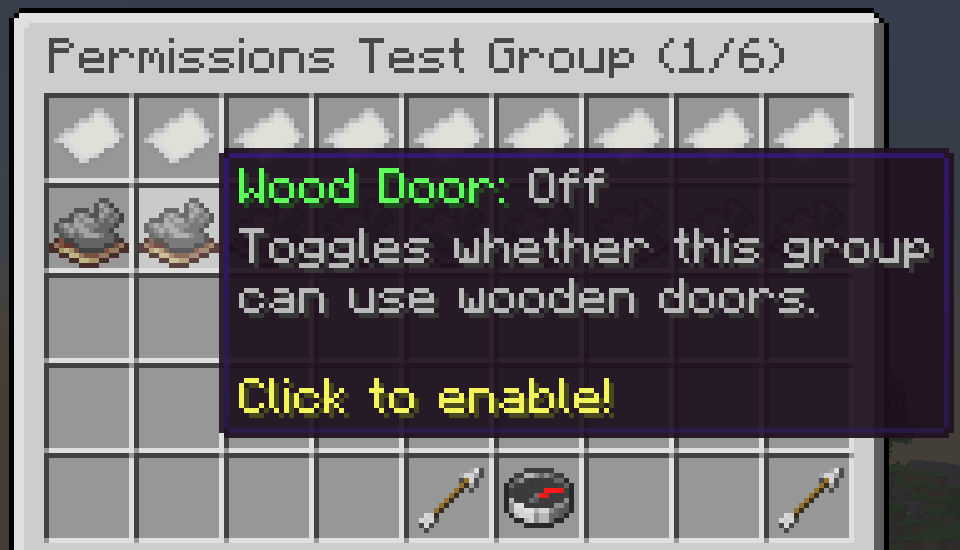
Wood Door: Off
Toggles whether this group can use wooden doors.
Click to enable!
Who should get Wood Door?
Wood Door can’t change a single block, and it only opens the doors already in your house. In most houses, every group should have it.
| Group | Wood Door | Why |
|---|---|---|
| Visitors | On | Doors are how they get around: into your rooms, shops, and buildings, and back out again. |
| Members | On | They need the same doors your visitors use. |
| Builders | On | Builders get in and out of their builds, and plenty of builds have doors. |
| Staff | On | Staff need to reach every part of your house. |
Keeping some doors closed
Turning Wood Door off for a group stops them from opening every wooden door in your house, not just one. If only a few doors should stay closed, like a staff room or a VIP area, use iron doors there and give Iron Door only to the groups that should get through. Your wooden doors keep working for everyone else.
Door permissions decide who can open and close a door, not who can walk through one that’s already open, so close doors like these behind you.
Wood Door permission FAQ
What does the Wood Door permission do in Hypixel Housing?
It lets everyone in a group open and close the wooden doors in your house. It doesn’t let them place or break doors; that takes the Build permission.
Why can’t players open the doors in my house?
Check the permissions of the group they’re in. Each kind of door has its own: wooden doors need Wood Door, iron doors need Iron Door, and wooden trapdoors, iron trapdoors, and fence gates each have one too. Turn on the ones your house uses.
How do I let visitors open doors in my house?
Open the Housing Menu with the Nether Star, click Permissions and Groups, pick the group your visitors are in, click the Edit Permissions book, and click Wood Door so it turns green. For iron doors, turn on Iron Door as well, unless they’re there to keep visitors out.
Can I lock just one wooden door?
Not with Wood Door. It covers every wooden door in your house for the whole group. For a door only some players should open, use an iron door there and give Iron Door only to the groups that should get through.
Where is Wood Door in the permissions menu?
It’s the second permission on page 1 of a group’s permissions editor, right after Fly, as of October 2026. You can also click the compass and search for it.
Is HypixelHousing.com affiliated with Hypixel?
No. HypixelHousing.com is an independent, community-run resource website. It is not owned by, operated by, affiliated with, endorsed by, or sponsored by Hypixel Inc. or the Hypixel Minecraft server.
Sources and updates
This guide is written and maintained by CTG123456, an early pioneer of the Free Build format on Housing. The screenshot was taken by CTG123456 on the latest version of Hypixel Housing with no texture packs, and the menu details were checked in October 2026.
Changelog
- First published.
Pick your next step
Whether you’re setting up your first group or hosting a busy Free Build, here’s where to go next.