
Fly: the permission that gets players off the ground
Fly lets everyone in a group fly around your house. It can’t place or break a single block, but it can carry players over walls into hidden rooms, staff areas, and secrets, and straight past parkour maps, mazes, and games. Here’s what it does, where it is, and who should get it.
- First on page 1
- On/off switch
- Can’t place or break blocks
What the Fly permission does
Fly does what its name says. Turn it on for a group, and everyone in that group can fly around your house. Turn it off, and they’re back on their feet, walking and jumping like everyone else.
It only changes how players move. Its tooltip says it toggles whether a group can fly, and that’s all it does: building, teleporting, and switching game mode each have their own permission.
With Fly on, players can
- Look over your whole build from above
- Reach high spots without stairs or ladders
- Get across a big house fast
- Get over walls, fences, and gaps that would stop them on foot
Fly doesn’t let them
- Place or break blocks (that’s Build)
- Teleport (that’s
/tp) - Change their game mode (that’s Switch Game Mode)
How players start flying
Once a group has Fly, its players double-tap the jump key (space by default) to take off. Holding jump rises, holding sneak (shift) sinks, and double-tapping jump again stops flying.
Where to find Fly
Fly is the very first permission in the editor: page 1, slot 1, as of October 2026. It’s right there as soon as you open a group’s permissions.
- Open Permissions and Groups. Open the Housing Menu with the Nether Star in your hotbar, then click the paper icon in the middle of the bottom row.
- Open a group’s permissions. Click the group, then the Edit Permissions book at the end of the second row.
- Find Fly on page 1. It’s the first permission on the page, or you can click the compass and search for it.
- Check the color. Green means it’s on, and gray means it’s off. Click it to switch.
- Fly
- Wood Door
- Iron Door
- Wood Trap Door
- Iron Trap Door
- Fence Gate
- Button
- Lever
- Use Launch Pads
Fly is slot 1, so no permission comes before it. Next in the menu is Wood Door, in slot 2.
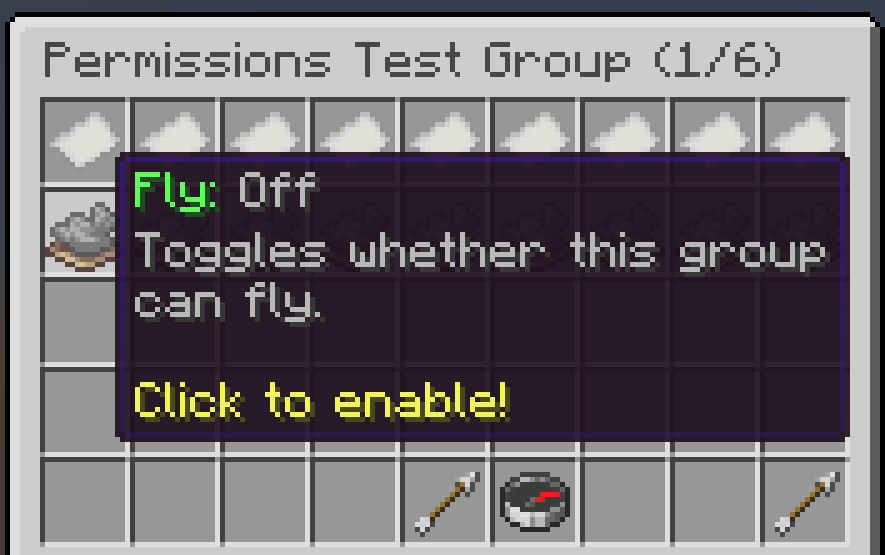
Fly: Off
Toggles whether this group
can fly.
Click to enable!
Who should get Fly?
Fly can’t change a single block, but a flying player can reach any part of your house that isn’t fully closed in. Before you turn it on, think about what your house is for, and what’s in it that players shouldn’t find.
| Group | Fly | Why |
|---|---|---|
| Visitors in a hub or showcase | On | They can explore your build from every angle, as long as nothing in it is meant to stay hidden. |
| Visitors in a house with secrets | Off | Walls and height only hide your staff areas, secret rooms, and easter eggs from players on foot. |
| Players in a parkour map, maze, or game | Off | Flying lets them float over the jumps, walls, and puzzles you built. |
| Free Build builders | On | Builders need it to reach higher areas, as the Free Build permissions table recommends. |
| Staff | On | Staff get around faster when they’re checking on players and builds. |
What to watch for
Flying players can reach anything you haven’t fully closed in: roofs, the tops of walls, gaps in a ceiling, and rooms with an open side. If your house has a staff room, a secret area, or a reward at the end of a parkour, keep Fly off for visitors, or close those spots in on every side, top included, before you turn it on.
Give flying its own group
If only some players should fly, turn Fly on in a group of its own, like Builders or Staff, instead of your default group. Visitors stay on the ground, and you never have to keep switching it on and off. Changing a group’s permissions changes them for everyone in it, so check who’s in the group first.
Two other permissions also change how players get around your house: /tp, which lets a
group teleport, and Use Launch Pads.
Fly permission FAQ
What does the Fly permission do in Hypixel Housing?
It lets everyone in a group fly around your house. It doesn’t let them place or break blocks; that takes the Build permission.
How do I let players fly in my house?
Open the Housing Menu with the Nether Star, click Permissions and Groups, pick the group, click the Edit Permissions book, and click Fly so it turns green. Everyone in that group can then fly.
Where is Fly in the permissions menu?
It’s the very first permission on page 1 of a group’s permissions editor, as of October 2026. You can also click the compass and search for it.
How do you start flying once you have the permission?
Double-tap the jump key (space by default). Hold jump to rise, hold sneak (shift) to sink, and double-tap jump again to stop flying.
Should visitors be able to fly in my house?
Only if nothing in your house depends on staying on the ground. Flying can’t change blocks, but it lets players reach hidden rooms, staff areas, and secrets, and skip parkour maps, mazes, and games. In an open hub or showcase with nothing to hide, it’s fine.
Is HypixelHousing.com affiliated with Hypixel?
No. HypixelHousing.com is an independent, community-run resource website. It is not owned by, operated by, affiliated with, endorsed by, or sponsored by Hypixel Inc. or the Hypixel Minecraft server.
Sources and updates
This guide is written and maintained by CTG123456, an early pioneer of the Free Build format on Housing. The screenshot was taken by CTG123456 on the latest version of Hypixel Housing with no texture packs, and the menu details were checked on . The Free Build recommendation comes from the Free Build permissions table.
Changelog
- Rated a medium-risk permission, with new advice for houses with hidden rooms, staff areas, and secrets.
- First published.
Pick your next step
Whether you’re setting up your first group or hosting a busy Free Build, here’s where to go next.